The Subscription details page shows your plan, the credits you've used this month, how overage is handled and what your subscription costs. Open it from Subscription in the dashboard sidebar, or from your account menu. The page's heading reads Credit usage.
Every member can see the page. Only owners and admins can change the overage setting or cancel the subscription; others see "Only organization owners and admins can manage billing".
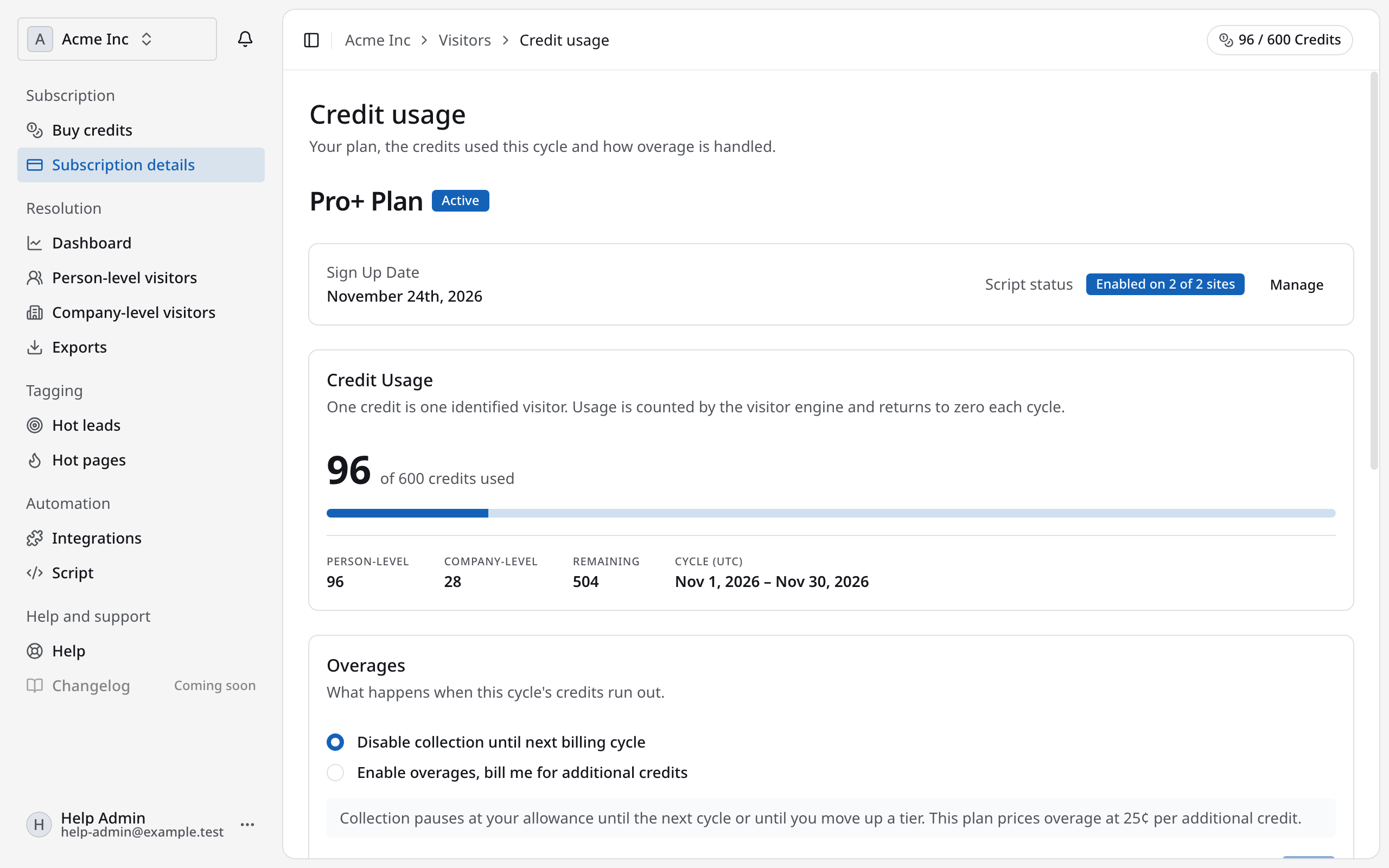
What you can do on the Subscription details page
See your plan
The top of the page names your plan, such as Pro Plan, with its status, such as Active or Past Due. During your trial it reads Pro+ trial, with a notice saying how many days are left and when the trial ends.
Check your sign-up date and script status
- Sign Up Date is when your organization was created.
- Script status shows Enabled, Disabled when collection is off on all your domains, Enabled on 2 of 3 sites when some are off, or Not installed when you haven't added a domain yet.
Select Manage to open the Script page, where owners and admins can make a domain inactive or active again.
Review your credit usage
Credit Usage shows the credits used this month out of your allowance, with a progress bar, and below it:
- Person-level and Company-level: the credits used by people and by companies;
- Remaining: what's left of your allowance;
- Cycle (UTC): the first and last day of the current calendar month, when your credits are counted.
If you've used more than your allowance with overages on, a line under the bar says how many credits are over and the rate they're billed at. See Understanding the Blue Tracely Credit System.
Manage overages
The Overages card sets what happens when this month's credits run out:
- Disable collection until next billing cycle: identification pauses until the next month.
- Enable overages, bill me for additional credits: identification continues, up to Maximum additional credits, at your plan's overage rate.
Select Save to apply a change. Owners and admins can open View overage change history. See Overages FAQs.
View your subscription details
The Subscription Details card shows:
- Subscription Amount: what your plan costs per month;
- Monthly Credits: your allowance;
- Additional Domain Seats: how many seats you have and their price, or "Not included on this plan";
- Overages: your plan's overage rate, or "Not included on this plan";
- Billed on: your next billing date, or Access until if your subscription is set to cancel.
From this card you can:
- Change your plan: opens the Buy credits page. See Managing Your Blue Tracely Plan and Credits.
- Cancel subscription: confirms, then keeps your plan until the end of the billing period before moving you to Free. See Canceling or Downgrading Your Blue Tracely Subscription.
- View past invoices: opens the Billing and Invoices page.
Review past credit usage
Past Credit Usage lists each month's Start Date, End date and Credits Used. For now it shows the current month only, marked Current.
Related pages
- Buy credits: choose or change your plan.
- Billing and Invoices: your invoices, payment details and the billing portal. See Updating Your Billing Information.