You can identify visitors on more than one website from a single Blue Tracely account. This article explains how domain seats work, what they cost, and how to add, deactivate and delete domains.
What are domain seats?
Each domain in your account uses a seat:
- Included seats: every plan includes one domain.
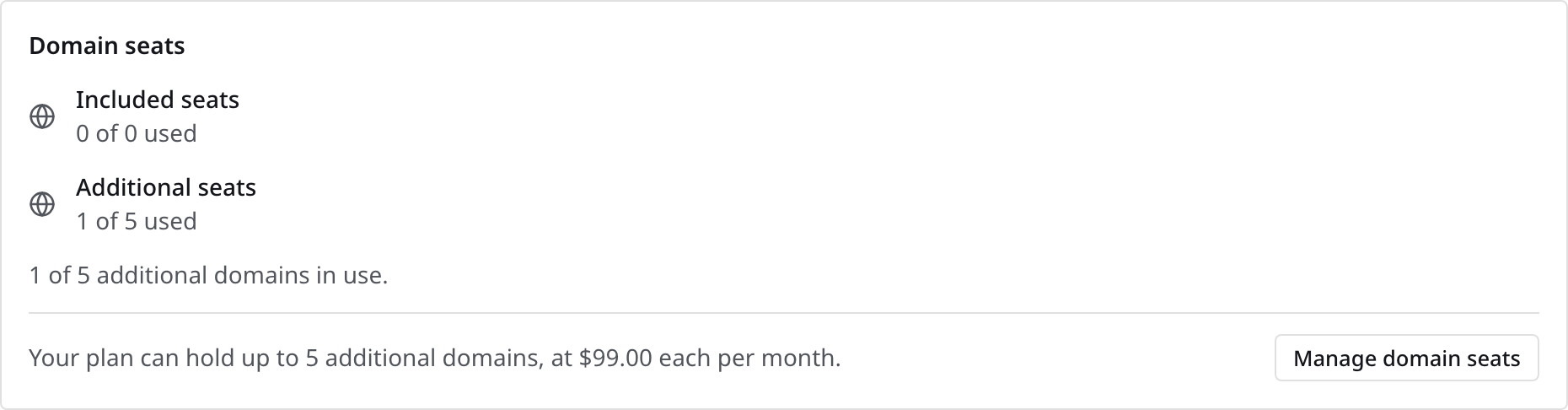
- Additional seats: on the Pro and Pro+ plans, you can buy up to 5 additional domain seats, at $99 each per month.
The Free and Starter plans, and the 7-day trial, don't offer additional domains. To add more than one domain, choose Pro or Pro+.
The Domain seats section of the Script page shows your Included seats and Additional seats, and how many of each are used.
A domain covers https://<domain> and https://www.<domain>. Any other subdomain, such as blog.example.com, is a separate domain and needs its own seat. Pages served over plain http:// aren't collected on.
Before you add a domain
- One shared view: visitors from all your domains appear together on Person-level visitors, Company-level visitors and the Dashboard. The lists can't be filtered by domain.
- Shared settings: hot lead filters, the Domain Exclusion List and your integrations apply to every domain. Each domain has its own Visitor capture settings (URL restrictions, repeat visitor collection and company-level collection), and each hot page belongs to one domain.
- Shared access: every member of your account sees the visitors from every domain. Access can't be limited by domain.
- Shared credits: all your domains use credits from the same monthly allowance.
If you need separate data, settings or billing for a website, see Choosing Between an Additional Domain Seat and a Separate Account.
Buying additional domain seats
Owners and admins can buy seats.
- Go to the Script page.
- Under Domain seats, select Manage domain seats. If all your seats are in use, you can also select Add a domain seat under Add a Domain.
- In the Domain seats dialog, use the plus and minus buttons next to Additional domains to choose how many additional seats you want.
- Check the price summary: the monthly total, what is Due now and your Next billing date.
- Select Add 1 seat (or the number you chose).
A seat you add is charged right away for the rest of the current billing period, and then monthly with your plan. It's available as soon as the payment goes through. If your payment method is declined, no seat is added.
You need a paid Pro or Pro+ subscription to buy seats. You can't change seats on a subscription that's scheduled to be canceled until you reactivate it.
Adding a domain
- On the Script page, select Add a Domain.
- Under Add a domain, enter the domain, such as
example.com, and select Add domain. - Install the script on that website. See Installing Your Blue Tracely Tracking Script.
Each domain gets its own script, so install the snippet shown for that domain. If Add domain is unavailable, the message under it explains why, for example that all your seats are in use.
Making a domain inactive
To pause collection on a domain without deleting it, select Make inactive next to it. It moves to Inactive domains. Select Make active to start collecting again.
An inactive domain keeps its seat. To free the seat, delete the domain.
Deleting a domain and removing seats
- Select the trash icon next to the domain.
- Select Delete domain to confirm.
Visitors on that domain stop being identified, and the script installed there stops working for good. If you add the domain again later, it gets a new script to install.
Deleting a domain frees its seat, but you keep paying for the seat until you remove it. To remove seats, open Manage domain seats, lower the number and select Remove 1 seat (or the number shown). The unused time is credited to your next invoice. You can't remove a seat that a domain is still using.
How it works
- One dashboard for every domain's visitors.
- One set of shared settings, except the capture settings, which are set for each domain.
- One subscription and one invoice, with your domain seats on it.