When a person wasn't sent to one of your integrations automatically, you can send them yourself with Re-sync. This article explains which integrations support it, how to use it and when it helps.
Integrations that support re-syncing
You can re-sync a person to any of your integrations that is turned on:
- Slack
- Microsoft Teams
- HubSpot CRM
- Salesforce CRM
Re-sync is available for people. Companies identified without a person can't be re-synced.
How to re-sync a person
Only owners and admins can re-sync.
- Go to Person-level visitors and select the person to open their details.
- At the top of the panel, select Re-sync.
- Under Send again to, choose the integration, for example Re-sync to Slack.
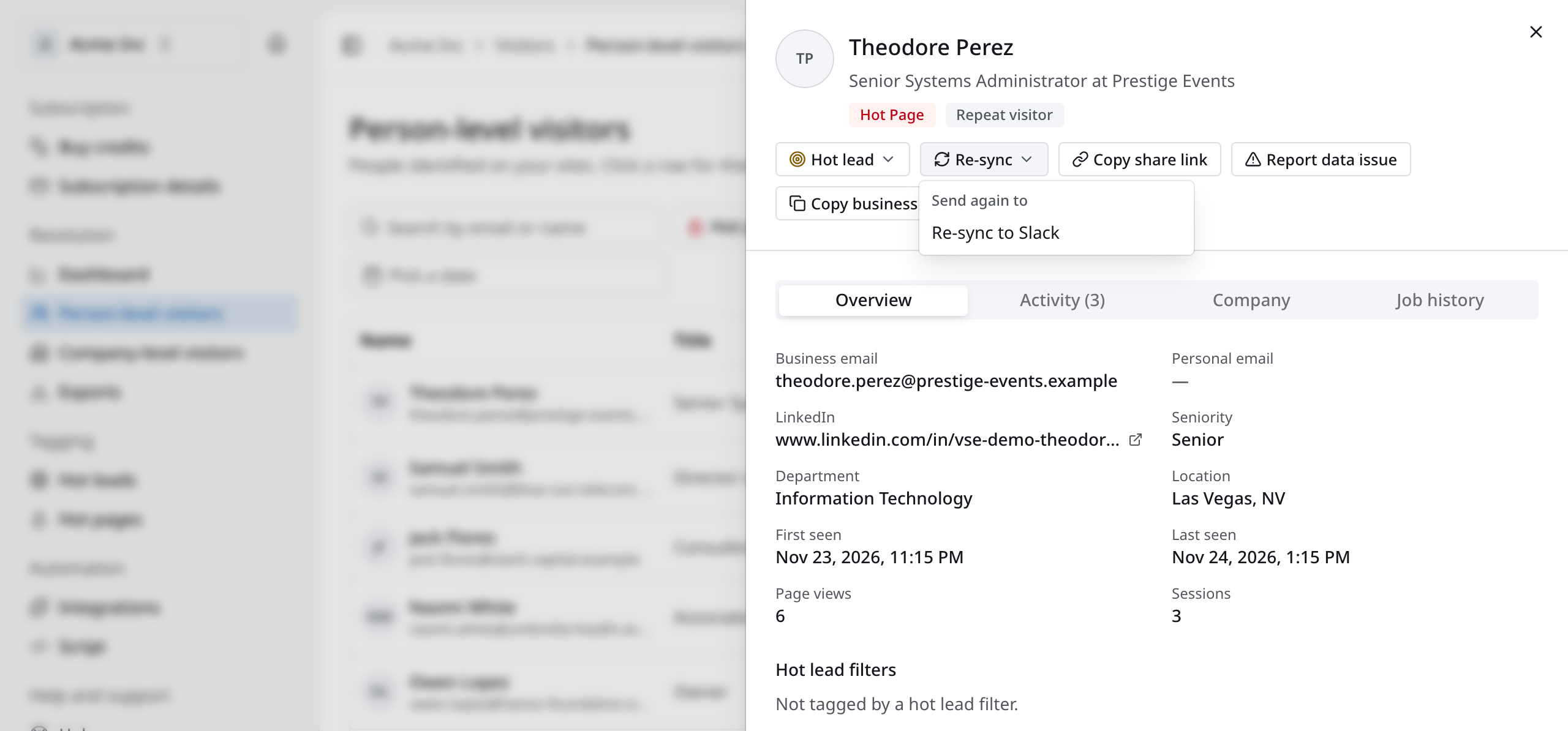
A message confirms it, for example "Queued for re-sync to Slack", and the person is sent shortly after. To check the result, look at Deliveries on the person's Overview tab, or open Sync logs.
If the menu shows No integrations enabled for delivery, none of your integrations is turned on. Connect one, or turn its Status on, from Integrations.
When should you re-sync a person?
- The person was identified before you connected the integration. Integrations receive only visitors identified while they're connected and turned on. Re-sync sends an earlier person.
- The integration was turned off when the person visited. Visitors identified while an integration is off aren't sent when you turn it back on.
- The person didn't match your hot lead filters, but you want them anyway. Re-sync sends the person even when the integration is set to send only hot leads.
- You tagged the person as a hot lead by hand. Tagging doesn't send anyone on its own. See Manually Tagging or Untagging a Profile as a Hot Lead.
- A delivery failed and you've fixed the cause. For example, after reconnecting the integration.
Things to know
- Slack still needs a LinkedIn profile. A person without one is never posted to Slack, even with Re-sync. Their Deliveries entry shows Cancelled with the reason.
- Your plan must include the integration. On a plan without HubSpot CRM or Salesforce CRM, the attempt is logged as Skipped.
- People on your Domain Exclusion List aren't sent. See Domain Exclusion List.
- Each re-sync sends the person again. In Slack and Microsoft Teams, it posts a new message.